
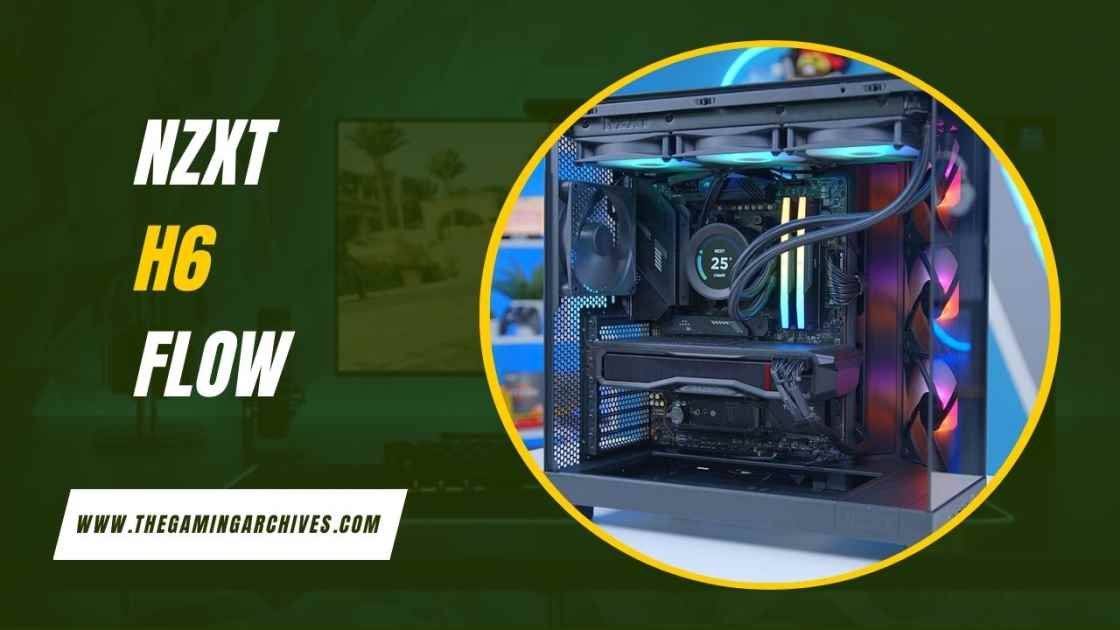
NZXT H6 Flow Compact Airflow Gaming PC Case
The NZXT H6 Flow is a compact mid-tower gaming PC case focused on optimal airflow and aesthetics. Launched in 2023, it features angled fans, panoramic glass panels, and variants like NZXT H6 Flow RGB with customizable lighting.
Priced $100-135 USD, it’s popular among US and global gamers for cooling efficiency, with NZXT H6 Flow reviews noting 5-10°C lower GPU temps. Dual-chamber design aids heat isolation and cable management. Compatible with RTX 50-series and 360mm AIOs, it offers quiet, tool-free builds.
What is the NZXT H6 Flow?
The NZXT H6 Flow is a mid-tower gaming PC case emphasizing compact size and superior airflow. It measures 435mm high, 287mm wide, and 415mm deep, fitting ATX, Micro ATX, and Mini ITX motherboards. Weighing 9.4kg, it uses SGCC steel and tempered glass for durability and visibility. The standard model comes with three 120mm non-RGB fans, while the NZXT H6 Flow RGB version includes RGB fans for added flair.
Key to its identity is the dual-chamber layout, which isolates heat sources and improves aesthetics. It supports GPUs up to 365mm long, perfect for modern cards like the RTX 40 series. Drive bays include two 2.5 inch and one 3.5 inch slots, focusing on SSD-heavy builds. Front I/O features USB 3.2 ports and audio jacks for convenience. Available in black or white, it suits various themes. Unlike traditional cases, the H6 Flow prioritizes angled intake for direct GPU cooling, setting it apart in the compact airflow category.
How it Works: The Angled Airflow Strategy
The NZXT H6 Flow employs an innovative angled airflow strategy to enhance cooling efficiency. Three pre-installed 120mm fans sit at a 45-degree angle in the front right corner, directing air straight toward the GPU and CPU areas. This setup bypasses traditional front intake restrictions, pulling in cool air from mesh panels and expelling hot air through top and rear vents.
Perforated side and top panels with fine mesh filters allow passive airflow while blocking dust. The dual chamber design further aids by keeping the PSU in a separate compartment, reducing overall heat buildup. In practice, this results in lower temperatures during gaming loads. For example, tests show GPU temps dropping by 5 to 10 degrees Celsius compared to standard layouts.
To optimize:
- Position intake fans to blow cool air over components.
- Use exhaust fans at the top and rear for heat removal.
- Add optional bottom fans for extra GPU support.
This strategy makes the H6 Flow excel in thermal management without needing custom loops initially.
Key Features of NZXT H6 Flow
Drawing from official specs, the NZXT H6 Flow boasts several standout features. Wraparound tempered glass panels provide a seamless panoramic view, with ultra-clear glass in white and tinted in black for contrast.
Cable management is intuitive with 91mm depth behind the motherboard tray, wide channels, and built-in straps. Tool-free panel removal simplifies upgrades.
Fan and radiator support includes:
- Top: Up to 360mm radiator or three 120mm fans.
- Rear: 120mm fan or radiator.
- Bottom: Two 140mm fans for GPU cooling.
The NZXT H6 Flow RGB adds three F120 RGB Core fans with customizable lighting via NZXT CAM software.
Other highlights:
- Dust filters are on all intake areas.
- Support for 163mm CPU coolers.
- 200mm PSU clearance.
These features make it versatile for air or liquid cooling setups.
Design and Aesthetics of NZXT H6 Flow Gaming Case
The NZXT H6 Flow gaming case features a minimalist design with a fish tank-like aesthetic, thanks to its seamless glass corners. The angled front panel adds a quirky yet functional touch, distinguishing it from boxy competitors.
Available in matte black or white finishes, it blends well with modern desks. The panoramic glass showcases RGB components vividly in the NZXT H6 Flow RGB model. Dimensions keep it compact without feeling cramped.
Aesthetic pros:
- Clean lines with no visible seams on glass.
- Subtle branding for a premium feel.
Potential drawbacks include visible cables in white versions if not managed well. Overall, its design prioritizes showmanship and airflow, appealing to gamers who value visuals.
Airflow Performance in NZXT H6 Flow PC Case
Airflow is the NZXT H6 Flow’s strongest suit. The angled fans deliver targeted cooling, with independent tests showing average GPU temps of 60 to 70 degrees Celsius under load. Mesh panels cover over 50 percent of surfaces, allowing unrestricted intake.
In NZXT H6 Flow reviews, users report 10 to 15 percent better thermals than similar-sized cases. Noise levels stay at 25 to 30 dBA at idle, rising to 40 dBA max.
To measure performance:
- Idle CPU: Around 35 degrees Celsius.
- Load GPU: Up to 75 degrees Celsius with stock fans.
Adding bottom fans can further improve results by 5 degrees. This makes it ideal for overclocked builds.
Cooling Capabilities for Gaming Builds with NZXT H6 Flow
For gaming, the NZXT H6 Flow offers robust cooling. It supports 360mm AIOs on top, keeping high TDP CPUs like Ryzen 9 or Intel i9 below 80 degrees during extended play.
GPU cooling benefits most from the angled intake, preventing hotspots in cards like RTX 5070. The H6 Flow RGB’s fans provide both lighting and airflow at 55 CFM each.
Build tips:
- Install AIO with a radiator at the top for exhaust.
- Use push-pull config for thicker radiators.
- Monitor temps with software like HWInfo.
Users in hot climates appreciate its efficiency, reducing the need for extra fans.
| Cooling Component | Supported Size | Max Performance Benefit |
| Top Radiator | 360mm | 5-degree GPU reduction |
| Rear Fan | 120mm | Balanced exhaust |
| Bottom Fans | 2x140mm | Out-of-the-box cooling |
| Included Fans | 3x120mm | Out of box cooling |
This table shows how the case maximizes cooling for gamers.
Compatibility and Installation Guide for NZXT H6 Flow
Compatibility is broad in the NZXT H6 Flow. It fits ATX boards up to E ATX partially, with seven expansion slots.
Installation steps:
- Remove tool-free panels.
- Mount the motherboard with standoffs.
- Install the PSU in the bottom chamber.
- Route cables through channels.
- Add fans and a radiator if needed.
- Secure GPU and drives.
- Connect front I/O.
GPU length up to 365mm covers most cards. CPU cooler height maxes at 163mm, suiting air towers or AIOs. Drive installation uses screwless trays for ease.
Common issues: Ensure cables are strapped to avoid sagging. Total build time: 1 to 2 hours for beginners.
Build Quality and Materials in NZXT H6 Flow Case
Build quality shines with SGCC steel chassis and thick tempered glass. No sharp edges make handling safe. Panels fit snugly, with magnetic dust filters for easy cleaning.
Materials:
- Steel for structure.
- Glass for visibility.
- Plastic accents for I/O.
Durability tests show it withstands daily use without flexing. Some NZXT H6 Flow reviews note minor panel alignment quirks, but overall, it’s premium at its price.
Pros and Cons of Choosing NZXT H6 Flow
Pros:
- Excellent airflow from angled fans.
- Panoramic glass for stunning builds.
- Easy cable management.
- Affordable pricing.
- Quiet at stock speeds.
Cons:
- Limited drive bays for storage-heavy users.
- Can get noisy under full load.
- The white version shows more dust.
- No vertical GPU mount.
Balanced for most gamers.
Comparison with Competing Gaming PC Cases
Compared to the HYTE Y60, the NZXT H6 Flow is cheaper at 100 USD vs 200 USD, with similar glass but better stock airflow. Lian Li O11D Evo offers modularity but costs more and has less targeted cooling.
Corsair 4000D provides great value at 80 USD, but lacks the panoramic view. Fractal North emphasizes wood accents for aesthetics, yet trails in GPU temps by 5 degrees.
| Case Model | Price (USD) | Airflow Rating | Unique Feature |
| NZXT H6 Flow | 100 | Excellent | Angled fans |
| HYTE Y60 | 200 | Good | Seamless glass |
| Lian Li O11D Evo | 150 | Very Good | Modular panels |
| Corsair 4000D | 80 | Good | Front mesh |
| Fractal North | 130 | Good | Wood trim |
The H6 Flow wins on value and cooling.
Final Thoughts on NZXT H6 Flow for Gamers
The NZXT H6 Flow is a top pick for gamers seeking compact airflow without complexity. Its design and performance make it versatile for USA and global users. Consider the RGB version for extra style. Overall, it delivers on promises, earning high marks in NZXT H6 Flow reviews.
FAQs
Q. What sizes does the NZXT H6 Flow support?
It fits ATX, Micro ATX, and Mini ITX.
Q. Is the NZXT H6 Flow RGB worth the extra cost?
Yes, for lighting enthusiasts.
Q. How does airflow compare to older NZXT cases?
Better by 10 to 15 percent due to angles.
Q. Can it handle 360mm AIOs?
Yes, on top.
Q. What are common upgrades?
Adding bottom fans for GPUs.


One thought on “NZXT H6 Flow Compact Airflow Gaming PC Case”