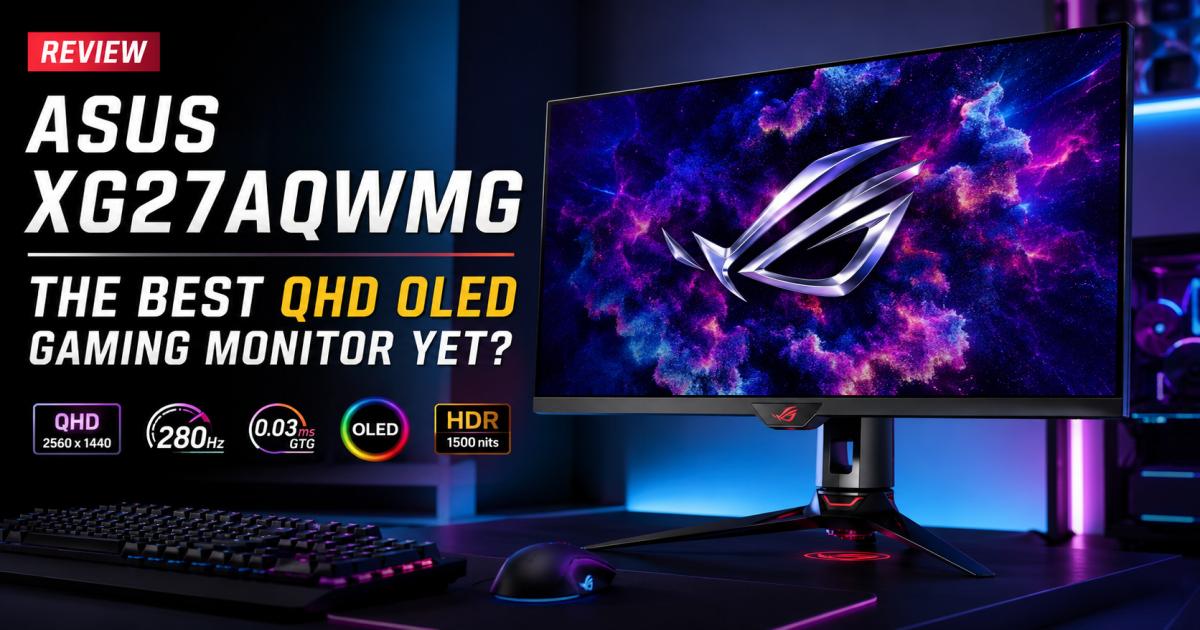
ASUS XG27AQWMG Review: The Best QHD OLED Gaming Monitor Yet?
Stop settling for washed-out colors and motion blur. The ASUS XG27AQWMG pairs a blazing 280Hz refresh rate with a multi-layer Tandem WOLED panel and a TrueBlack Glossy finish. For years, display manufacturers struggled to balance speed, contrast, and brightness. They frequently relied on dull matte screen coatings just to hide room reflections, which ruined text clarity. ASUS ignores that trend completely. Instead, they built a brighter, highly durable multi-layer display that functions like a sheet of pure glass.
I ran this 27-inch powerhouse through fast-paced tactical shooters and graphically demanding RPGs to measure exactly how it handles high frame rates. If you want a display that handles both competitive esports and cinematic single-player campaigns without compromise, here is the definitive breakdown.
ASUS XG27AQWMG Review: Quick Verdict
This display absolutely rules the 27-inch 1440p category. By fixing the two most frustrating issues with earlier OLEDs—dim peak brightness and hazy matte finishes—ASUS hands competitive players a nearly flawless tool. The 280Hz speed tracks fast-moving targets perfectly, while the infinite contrast makes shadows look remarkably deep. It misses a built-in KVM switch and USB-C charging, which drops its score for multi-device office setups. However, its raw gaming capability remains undisputed.
Score Breakdown
- Overall Rating: 4.7 / 5
- Gaming Performance: 5.0 / 5
- HDR Quality: 4.8 / 5
- Productivity: 3.8 / 5
- Value for Money: 4.2 / 5
Core Specifications at a Glance
| Feature | Specification |
| Viewable Area | 26.5 inches |
| Native Resolution | 2560 x 1440 (QHD) |
| Panel Architecture | Tandem WOLED |
| Surface Finish | TrueBlack Glossy (Zero-haze) |
| Refresh Speed | 280Hz |
| Response Time | 0.03ms (GtG) |
| HDR Peak Brightness | 1,500 nits |
| Color Gamut | 99.5% DCI-P3 |
Pros and Cons
Pros
- Tandem OLED Architecture: Stacking four emissive layers dramatically increases light output and extends the lifespan by up to 60% compared to older designs.
- TrueBlack Glossy Surface: Removes the grainy diffusion layer seen on matte screens, ensuring text looks sharp and colors jump off the screen.
- Zero Motion Blur: Pushing 280 frames per second with a 0.03ms response time means moving objects never leave a blurry trail.
- Smart Proximity Sensor: A physical sensor automatically drops screen brightness when you walk away, actively preventing pixel degradation.
Cons
- Lacks Office Connectivity: Sharing this screen across a work laptop and a gaming tower is frustrating without USB-C power delivery or a KVM switch.
- Minor Text Fringing: The WOLED subpixel layout causes small desktop text to look slightly softer than a standard IPS monitor.
- Premium Price Tag: Adopting the newest panel technology means you pay noticeably more than you would for a standard 240Hz screen.
Who Should Buy the ASUS XG27AQWMG?
Spending premium money on PC hardware requires matching the tool to your actual daily habits.
Perfect Match For
- Esports Competitors: If your matchmaking rank relies on spotting enemies instantly, the 280Hz speed and 0.03ms pixel response grant a measurable physical advantage in gunfights.
- Immersion Seekers: Players who spend hundreds of hours in visually rich titles like Cyberpunk 2077 will appreciate how the glossy screen makes neon lights pop against pitch-black shadows.
- Modern Console Owners: The display packs full HDMI 2.1 bandwidth, perfectly handling the PS5 and Xbox Series X at 1440p and 120Hz with Variable Refresh Rate enabled.
Skip It If
- You Work From Home Full-Time: If you stare at tiny spreadsheet numbers for nine hours a day, buy an IPS monitor. The specific subpixel layout creates mild text fringing, and static taskbars naturally invite burn-in risks over thousands of hours.
- You Constantly Swap Computers: With no KVM switch or USB-C hub, manually unplugging cables between a MacBook and a gaming PC gets annoying fast.
Hardware Design and Stand Ergonomics
ASUS constructs their ROG lineup with an aggressive but highly functional aesthetic. The XG27AQWMG follows this tradition perfectly, prioritizing desk space and physical flexibility.
Desk Footprint and Adjustability
Rather than forcing a massive, desk-hogging tripod onto your workspace, ASUS opted for a compact hexagonal base. It leaves plenty of room for wide, low-sensitivity mouse swipes. The stand allows extensive physical adjustments: a +20° to -5° tilt, +45° to -45° swivel, 110mm of vertical height travel, and a 90-degree pivot for a portrait layout.
Additionally, the top of the stand includes a standard 1/4-inch tripod thread. You can screw a DSLR camera or ring light straight into the mount, freeing up even more desk space and perfectly framing your face for streaming.
Mounting and Cabling
A dedicated cutout in the stand routes your display and power cables cleanly out of sight. If you prefer floating setups, the 100x100mm VESA compatibility handles standard monitor arms easily. Since the monitor weighs a mere 4.8 kg without its base, you do not need an expensive, heavy-duty arm to prevent it from sagging.
Display Quality: Understanding the Tandem OLED Upgrade
The screen technology separates this unit from the crowded 1440p market. The mix of a Tandem structure and a high-gloss finish drastically alters the visual experience compared to older generation displays.
Why Tandem WOLED Matters
Standard OLED panels rely on a single light-emitting layer. The XG27AQWMG uses a new “Tandem WOLED” architecture, which stacks four separate layers. Dividing the electrical stress across multiple layers produces two massive benefits: the screen pushes out 15% more brightness and extends its operational lifespan by 60%. The display runs cooler, consumes less localized power, and hits peak highlights harder than any previous 27-inch model.
The TrueBlack Glossy Impact
Gamers frequently complain about matte screen coatings. Matte layers scatter room light to reduce reflections, but they also scatter the light exiting the monitor, creating a grayish haze. The TrueBlack Glossy surface removes that diffusion entirely. It functions like a clean window. Colors punch through with intense saturation, and blacks refuse to wash out under standard room lighting.
Brightness and Contrast Limits
Because OLED pixels generate their own light and turn off completely to show black, the contrast ratio sits at an infinite 1,500,000:1. Dark caves in video games appear genuinely dark, free of the glowing corners common on LCDs.
During standard desktop use, the display gets plenty bright for daytime reading. When you activate High Dynamic Range (HDR), a custom passive heatsink allows small objects—like a flashlight beam or magical spell—to briefly blast up to 1,500 nits of brightness. This creates a stunning dynamic range that standard monitors simply cannot replicate.
Out-of-the-Box Color Accuracy
ASUS calibrates these units extensively before they ship. The panel reproduces 99.5% of the DCI-P3 color gamut using true 10-bit color depth. Testing typically shows a Delta E variance of less than 2, meaning the reds and blues you see match exactly what the developers programmed. Skin tones look natural, and explosions look appropriately vibrant.
Competitive Gaming Performance
A beautiful screen means nothing if the motion looks messy. The ASUS XG27AQWMG passes high-speed motion tests without breaking a sweat.
280Hz Speed and Instant Response
Most high-end QHD screens stop at 240Hz, but ASUS pushed this panel to 280Hz. That extra 40 frames per second adds a slight but noticeable layer of smoothness during rapid camera movements. Paired with the near-instant 0.03ms Gray-to-Gray response time of OLED technology, motion blur simply vanishes. You can easily read the text on a fast-moving car or track a falling object with perfect clarity.
Input Lag Testing
The delay between clicking a mouse and watching a gun fire sits near zero milliseconds. Fast-paced games feel directly connected to your hand. Furthermore, “ghosting”—that annoying blurry trail trailing behind moving objects on older VA panels—cannot physically occur on this Tandem OLED architecture. The pixels transition colors too quickly for smearing to happen.
Real-World Testing Examples
- Valorant & Counter-Strike 2: In tactical shooters, holding tight angles feels effortless. The complete absence of motion blur lets you track enemy character models clearly during chaotic spray transfers. The 280Hz refresh rate ensures you see an enemy peeking a corner the exact millisecond they appear on the server.
- Call of Duty: Warzone: The 1440p resolution provides enough pixel density to spot snipers hundreds of meters away. The glossy surface keeps the map looking punchy, preventing enemies from hiding in washed-out textures.
- Cyberpunk 2077: Driving at night with HDR turned on looks incredible. Pitch-black shadows frame blindingly bright neon signs, while the glossy finish makes rain puddles look photorealistic.
Console Gaming: PS5 and Xbox Series X
This monitor acts as an exceptional display for modern living room consoles, providing features that standard televisions often lack.
Both the PlayStation 5 and Xbox Series X natively output 1440p signals. The XG27AQWMG maps these signals pixel-for-pixel, creating a much sharper image than you typically get playing on a large 4K television from across the room.
Two HDMI 2.1 ports supply the massive bandwidth needed for 120Hz console gaming. The system fully supports Variable Refresh Rate (VRR). When a graphically heavy game drops frames during an intense boss fight, the monitor instantly syncs its refresh rate to the console. This completely prevents screen tearing and stuttering, keeping the gameplay visually smooth even when the hardware struggles.
ASUS OLED Care and Burn-in Prevention
Permanent image retention scares away many potential OLED buyers. ASUS combats this aggressively using a large internal heatsink and specialized software to ensure the panel lasts for years.
- Automatic Pixel Cleaning: Whenever you power the screen down, it quietly runs a brief maintenance cycle to refresh the pixel structure and clear out temporary image retention.
- Screen Move (Pixel Shift): The monitor imperceptibly moves the entire desktop image by a few pixels every few minutes. This prevents static elements, like a health bar or a mini-map, from burning into the same spot.
- Neo Proximity Sensor: A small physical sensor sits on the bottom bezel. If you leave your desk to grab a drink, the sensor detects your absence and drops the screen brightness to protect the panel. It turns the brightness right back up the moment you sit down.
- Logo Dimming: The monitor intelligently detects static logos (like a broadcaster watermark on a YouTube video) and slightly dims just that specific area of the screen.
DisplayWidget Center and OSD Navigation
Navigating monitor menus using clunky plastic buttons is notoriously awful. ASUS provides a much better solution.
Rather than reaching behind the screen, you can download the ASUS DisplayWidget Center app. This software allows you to adjust brightness, swap color profiles, and manage your OLED Care settings directly from your Windows desktop using your mouse.
If you do need to use the physical controls, a snappy four-way joystick on the back of the monitor makes navigating the On-Screen Display (OSD) fast and intuitive. The menu includes several built-in gaming aids, including a dynamic crosshair that automatically changes color to contrast against whatever background you are looking at.
Ports and Connectivity Layout
The rear input panel handles gaming peripherals well, but lacks modern office connections.
| Input Type | Amount | Specification |
| DisplayPort | 1 | DP 1.4 with Display Stream Compression (DSC) |
| HDMI | 2 | HDMI 2.1 (Full FRL Bandwidth) |
| USB Hub | 2 | USB 3.2 Gen 1 Type-A |
| Audio | 1 | 3.5mm Headphone Jack |
Note: While it uses DP 1.4 instead of the newer DP 2.1, Display Stream Compression allows the monitor to run 1440p at 280Hz with 10-bit color visually loss-free. The omission of a KVM switch or a USB-C port with power delivery is the only major hardware disappointment.
ASUS XG27AQWMG vs the Competition
How does this specific model hold up against a crowded 1440p market?
ASUS XG27AQWMG vs ASUS XG27AQDMG
The XG27AQDMG is the older sibling. It also uses a glossy screen, but relies on a standard WOLED panel locked at 240Hz. The newer XG27AQWMG pushes up to 1,500 nits (compared to 450 nits), runs at a faster 280Hz, and features a longer-lasting Tandem structure. Paying the extra money for the newer Tandem version is highly recommended.
ASUS XG27AQWMG vs LG 27GX700A-B
LG manufactures the base panels for many competing brands, but their own 27-inch OLEDs typically use matte coatings and stop at 240Hz. The ASUS beats the LG comfortably. The glossy screen provides dramatically better visual clarity, and the custom ASUS heatsink sustains bright HDR highlights much longer before automatically dimming to protect the display.
ASUS XG27AQWMG vs MSI MPG 271QRX
The MSI MPG 271QRX utilizes a QD-OLED panel to hit a massive 360Hz refresh rate. If you play esports professionally for cash prizes, buy the 360Hz MSI. However, QD-OLED screens often look slightly purple under bright room lights. The ASUS WOLED screen keeps blacks perfectly dark during the day, and its glossy finish delivers a superior, punchier movie-watching experience.
Final Verdict
The ASUS XG27AQWMG currently rules the 1440p monitor space. By combining the massive 1,500-nit peak brightness of a Tandem WOLED architecture with the pure clarity of a TrueBlack Glossy finish, ASUS eliminated the two biggest flaws of earlier OLED screens.
Office workers will find the lack of USB-C annoying, but competitive players will find absolutely nothing to complain about. The 280Hz speed tracks perfectly, the colors look phenomenal, and the physical proximity sensor prevents burn-in automatically. If you want the absolute best visual experience a QHD resolution can offer right now, put this display on your desk.